# Review a PR and post a summary to Slack
#The problem
Every team has the same loop. Someone opens a pull request, and the reviewer has to read the diff, work out the risk, and then message the team: "PR 142 is ready, touches auth, needs a second pair of eyes." That last step is easy to forget, and the summary is usually written in a hurry.
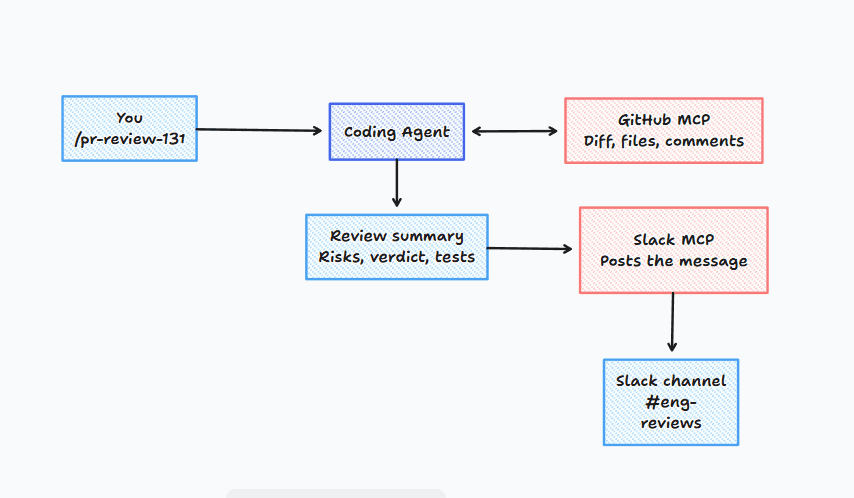
This workflow automates the loop. You run one command in your coding agent. The agent reads the PR through the GitHub MCP, reviews it using a skill that defines what a good review looks like, and posts a short structured summary to Slack through the Slack MCP.
#What's in this workflow
| Part | Role |
|---|---|
| GitHub MCP | Reads the PR: title, description, changed files, diff, comments, CI status |
| Slack MCP | Posts the final message to a channel |
pr-review-summary skill | Instructions for how to review and how to format the Slack message |
/pr-review command | Shortcut that takes a PR number and runs everything |
Installation
Install & Setup
Configure agent tools for pr-review-to-slack
npx goatmcp install pr-review-to-slack --agent cursor- You run
/pr-review 142. - The agent loads the skill, which tells it what to check and how to format the output.
- It calls the GitHub MCP to fetch the PR metadata, diff, and CI status.
- It writes the review summary.
- It shows you the draft and asks for approval.
- On approval, it calls the Slack MCP to post to the channel.
# Prerequisites
- A coding agent that supports MCP (Claude Code, Cursor, VS Code, Windsurf, or Claude Desktop)
- A GitHub token with read access to the repo (
reposcope for private repos, or a fine-grained token with Pull requests: read) - A Slack bot token with
chat:write, with the bot invited to your target channel - Node.js 18 or newer if the Slack server runs through
npx
The installer detects your agent, merges the MCP configs into the right file, copies the skill and command, and tells you which environment variables are still missing.
Set your tokens:
export GITHUB_TOKEN="your_github_token"
export SLACK_BOT_TOKEN="your_slack_bot_token"#Example commands
/pr-review 142
/pr-review 142 #backend-reviewsPlain-language prompts also work:
Review PR 142 in acme/api and post a summary to #eng-reviews.Review the open PRs assigned to me and draft one Slack summary for each. Don't post yet.Review PR 142 with a focus on security and database migrations, then post to Slack.#What the Slack message looks like
PR #142: Add rate limiting to login endpoint, by @riya
Verdict: Needs discussion

What changed: Adds a Redis-backed limiter (5 attempts / 15 min) to /auth/login.
Touches middleware, config, and two tests.

Risks:
- Limiter fails open if Redis is down. Confirm that's intended.
- New env var RATE_LIMIT_REDIS_URL not added to the deploy config.

Tests: Happy path and lockout covered. No test for the Redis failure case.

https://github.com/acme/api/pull/142#Safety defaults
- Approval before posting. The skill shows a draft first.
- Least privilege tokens. Use a read-only GitHub token and a Slack bot limited to one channel.
- No secrets in the repo. Tokens live in environment variables, and config files only hold
${ENV_VAR}references. - Prompt injection awareness. The skill treats PR content as data, not instructions.
#Troubleshooting
| Problem | Fix |
|---|---|
| Agent can't find GitHub tools | Restart the agent after adding the MCP, then list connected MCP servers to confirm |
Slack returns not_in_channel | Invite the bot with /invite @your-bot |
Slack returns invalid_auth | The token is wrong or belongs to a different workspace |
| 401 or 403 from GitHub | The token lacks repo access, or the org requires SSO authorization |
| Command not recognized | Check that pr-review.md is in your agent's commands folder |